Be aware: Sometimes, posts are delayed. We apologize for that! MLK Day in the US is the third Monday of January, this year, January 15, 2024. Ask a Tech Teacher's 19-page two-lesson plan bundle to teach about Martin Luther King (click for more information) is 66% off January 12, 2024 through Jan. 15, 2024. Lesson plans include: - an Event Chain of Dr. King's impact on American
history (adaptable to other historical events)
- interpreting his words with a visual organizer
Click for details |
In this monthly column, I share the most popular post from my writer's blog, WordDreams. Why? Because a lot of
teachers are also authors. This one is from a while ago, but it's about dogs. If you love these critters the way I do, you understand. Today, Thomas Wikman, proud owner of a Leonberger named Bronco, author of the definitive book on this breed, The Life and Times of Le Bronco, and I, soulmate to my fictional Canis-dog Ump, sometimes star of the Dawn of Humanity trilogy, will compare stories about our massive dogs. Despite that Ump passed on about 2 million years ago and Bronco more recently, the two huge furballs have gotten to know each other over the mythical Rainbow Bridge, the passage that carries pets to their Life Ever After. Though Ump is more wolf than domesticated dog (akin to the extinct Borophagus) and Bronco is a
Leonberger, one of the largest dog breeds in the world, the two have a lot in common. Here are the questions Thomas and I will answer: Q: I only want to print part of the webpage, not the entire thing. How do I quickly print just a selection? A: Another reason for printing only part of a page is that you might want to save paper. To print a portion of a page: - highlight the desired text
- press
Ctrl+P
- in the Print dialog box: in Print Range (or similar), click Selection, then OK
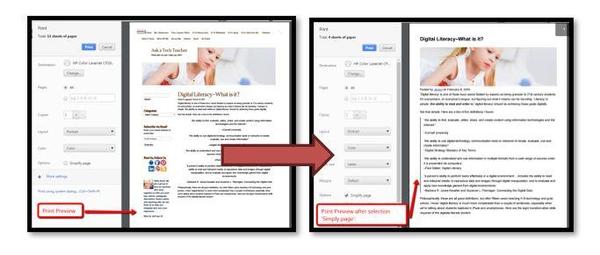
Now, only the selected portion of the Web page will print. You can also print only the text, leaving out the ads etc. Compare the first inset below to the second, printed through a browser extension called Readability: January 8th-11thfor free!"25 Digital Tools for the Classroom" is a thorough discussion on which are the most useful tools in a K-8 classroom. This includes popular digital tools such as blogs, backchannel devices, vocabulary decoding tools, avatars, digital portfolios, digital notetaking, as well as others you may not have thought of. Here's what you do: - Sign up for our newsletter, Weekly Websites, Tech Tips, and Tech Ed News. If you already subscribe, qualify by purchasing one of our resources on the Structured
Learning website. Any product, any price qualifies.
- Email us the welcome message or receipt you receive (we're at askatechteacher at gmail dot com). Make the subject line read, "Please send free '25 Digital Tools for the Classroom'".
- We'll send you the collection.
- If the newsletter doesn't work for you, there's an 'unsubscribe' at the bottom of each email.
Questions? Go ahead and ask! I love tech ed questions. You can either reply to this newsletter, contact me via email, or find me on X/Twitter (@askatechteacher). |
|